
Outreach
You write, SpeakerRadar keeps the sequence going.
Campaigns from your own mailbox: one to five emails, personal for every organizer, with follow-ups, a block list and every reply in your inbox. Part of the Business plan.
 Emily CarterMidwest Credit Union LeagueInterested
 James WhitfieldAtlantic Workforce CouncilLater
 Sarah MitchellNorthern Health Professions CouncilNot interested
- RBRyan BrooksPacific Business ForumInquiry
 Emily CarterMidwest Credit Union Leadership ForumInterestedIn talks
Email 1 · Association conferences 2027
Emily Carter
Thanks for reaching out. Your topic is a good fit for our leadership forum in March. Do you have time for a quick call next week?
Why Outreach
Everyone writes the first email. Almost everyone forgets the third.
An email to an organizer rarely gets an answer the first time. Follow-ups slip through the cracks and replies scatter across your mailbox. Outreach keeps the whole process together for you, without a stranger’s address writing in your name.
01 Sequence
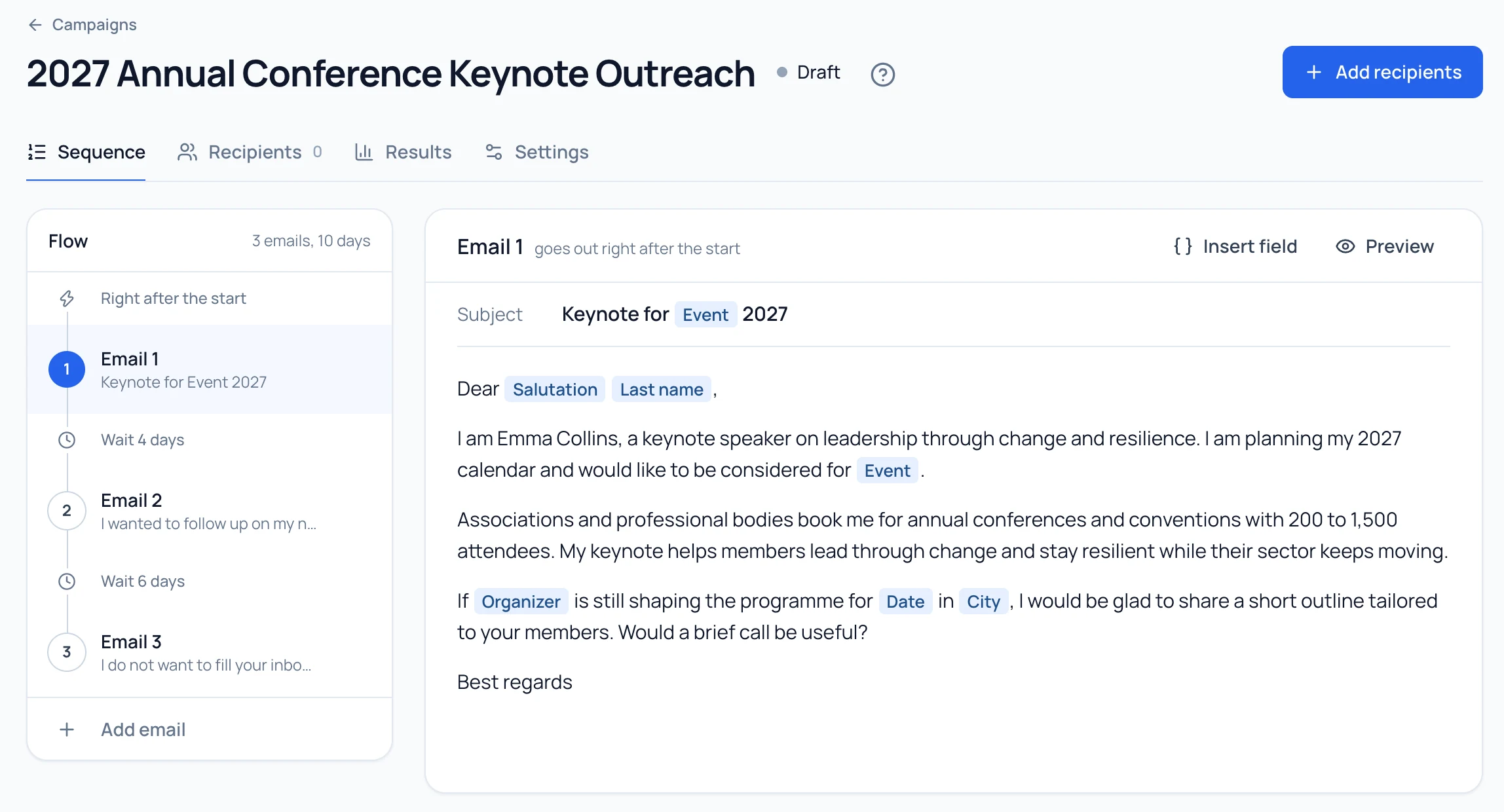
Write a sequence that feels personal.
One to five emails with waiting days in between. Fields for salutation, first name, role, event, organizer, date and city fill in from your events, with fallbacks when something is missing.
- Up to five emails; you set the subject lines and waiting days
- Preview with the real values of every recipient
- If you like, the AI drafts the sequence with follow-ups 3 to 7 days apart
02 Recipients
Pick recipients from your radar.
From organizers, from events or from a CSV of your own contacts. For every event SpeakerRadar takes the best contact with an email address. Before anyone is added, you see who gets skipped and why.
- Duplicate protection across all your campaigns
- Block list for addresses and domains
- A note on contacts an earlier campaign ended without a reply
- Emily CarterMidwest Credit Union Leadership ForumAdded
- James WhitfieldFuture of Work SummitAdded
- Sarah MitchellHealthcare Innovation CongressAdded
- Redwater Robotics Inc.Sales Kick-offNo email address
 Daniel HughesUK Retail Leaders ConferenceIn another campaign
3 added, 2 skipped
03 Sending
Send at a sensible pace, from your mailbox.
Google, Microsoft or IMAP: you connect your own mailbox and every email goes out in your name. When someone replies, their sequence ends. An out-of-office reply pauses it; bounces and unsubscribes go on your block list.
- A daily limit, 20 emails by default
- Sending on weekdays between 8 am and 5 pm in the recipient’s time zone, with random gaps
- No tracking pixels, no redirected links
SPF and DMARC found
04 Inbox and results
Reply from an inbox that knows your radar.
Every reply sits in your inbox, next to the event and the organizer. You add tags, mark things done and answer right from your mailbox. The event’s stage updates along the way.
- Tags such as Interested, Later or Not interested
- Sent, replies and reply rate per email
- Inquiries from your directory profile land in the same inbox
48
Sent
9
Replies
4
Interested
Per email
| Sent | Replies | Reply rate | |
|---|---|---|---|
| Email 1 | 24 | 5 | 21% |
| Email 2 | 16 | 3 | 19% |
| Email 3 | 8 | 1 | 13% |
Sender principle
You are the sender.
Your emails go out from your mailbox, in your name, to recipients you choose, with texts you approve. SpeakerRadar provides the tool and carries out the sending on your behalf. That is why you stay responsible for your outreach: only write to people you are allowed to contact and use the unsubscribe link field.
Your mailbox, your name, your texts
Nothing starts until you have reviewed the recipients
Unsubscribe link as its own field
FAQ
Questions about Outreach.
Their sequence ends, the reply shows up in your inbox and you answer right from your mailbox. By default the campaign then also ends for their colleagues at the same organizer. An out-of-office note pauses the sequence until after the date it mentions.
As many as your daily limit allows: 20 by default, at most 100. Sending only happens on weekdays between 8 am and 5 pm in the recipient’s time zone, with random gaps. Replies from the inbox don’t count toward the limit.
Only when you ask it to. With “Create with AI” you get a draft of the whole sequence from your profile and your goal, which you review, edit and approve. Otherwise you write it yourself.
No. Being named publicly is not consent. Depending on where you and the recipient are, advertising by email can require prior express consent, even toward companies. You are responsible for every email; the rules are in the Additional Terms for Outreach. We do not give legal advice. Read the Additional Terms

The next reply lands in your inbox.
Try Business free for 7 days, connect your mailbox and start your first campaign.